Designing Useful Alerts for Intermittent Connectivity

Executive summary
Alert systems are usually designed and tested under the best possible conditions: a healthy network, a live feed, a responsive operator. Then they are deployed into the real world, where sites go offline, uploads arrive in batches at odd hours, and the network itself is the thing most likely to misbehave. The result is familiar to anyone who has run distributed operations: an alerting setup that alternates between two useless extremes. It cries wolf whenever a connection blips, training everyone to ignore it, or it goes quiet when data stops flowing, so the first sign of trouble is a customer calling. Neither failure shows up in a demo. Both show up at 2 AM.
This post is about the middle path: alert design that treats connectivity as a first-class signal rather than an inconvenience. It is written for small teams running operational software — readiness trackers, status boards, sensor dashboards — for sites or users that are only sometimes connected.
The two failure modes nobody designs for
The wolf-crier fires an alert every time a feed is late. The operator learns within a week that most of these alerts mean nothing, and dismisses them without reading — including, eventually, the one that mattered. The silent system does the opposite: when data stops arriving, it simply shows nothing new, and "no news" gets read as "no problems." The first sign of an actual failure is the point at which someone needed the data and found it stale.
Both failures come from the same design mistake: treating missing data as an error to be alarmed about (wolf-crier) or as a non-event to be ignored (silent system). Missing data is neither. It is a distinct operational condition with its own meaning, and it deserves its own signal.
Name the silence: "no data" is a status, not an error
The single most valuable change is to stop reporting connectivity gaps as either errors or silence, and start reporting them as an explicit status: this source has not checked in since a known time, and here is when we expect it next.
That takes three pieces of information to display instead of one. For each data source, track the last successful contact time. Track the expected check-in interval — not the ideal one, the real one, including that one site that reliably uploads in batches every eight hours. Then show the difference as a simple state: nominal, late, or dark. "Late" is not an alarm. "Dark" past its worst-case window is worth attention.
This is the deckplate gap in alert design: the operator's real question is rarely "is there an alert?" It is "is the picture in front of me trustworthy right now?" A system that answers the second question makes the first one almost easy.
Separate the alarm from the silence
With the status named, you can split your alerts into two clean categories that never share a channel:
Data alarms mean: the data arrived, and something in it is wrong. A reading out of range, a count past a threshold, a failure recorded in the payload itself. These are genuine operational alerts and deserve to interrupt someone.
Connectivity notices mean: the data has not arrived, and we cannot yet say whether anything is wrong. These should update a status board, appear in a daily digest, and escalate to a person only when a source has been dark past its worst-case window — and even then, the escalation says "verify the site is reachable," not "respond to incident."
Blurring the two channels is how alert systems train their operators to ignore them. A connectivity notice that pages like a fire alarm is a wolf-crier in waiting. A data alarm buried in a digest of sync notices is a silent failure with extra steps.
Handle the catch-up: what fires when data floods back
The moment a connection restores is its own design problem, because a backlog arrives all at once. The naive system evaluates every delayed record as if it just happened, and fires a burst of stale alarms about conditions that resolved themselves hours ago — the worst kind of wolf-crying, because every alert in the burst was technically "real."
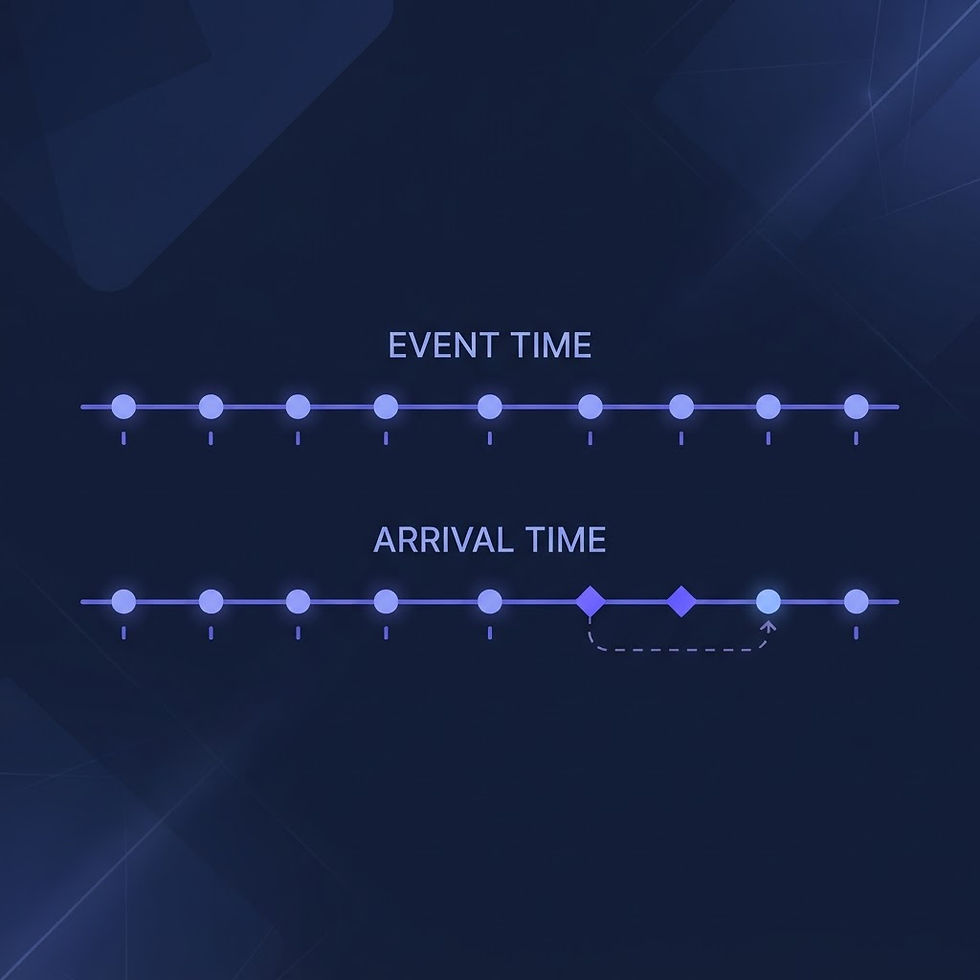
The rule for catch-up evaluation: evaluate late records against their event time, not their arrival time. An out-of-range reading from six hours ago that has since been followed by three healthy readings is not an alarm; it is history. The exception is persistence: if the out-of-range condition was still present in the most recent records, then it is current and should alarm, once, with the full timeline attached.
One practical addition for distributed teams: log every catch-up evaluation. When someone later asks why no alarm fired for a condition that was real, the record showing that it self-resolved before restoration — with timestamps — is the difference between a defensible system and a suspicious one.
A 30-minute audit of your alert design
Pull your last month of fired alerts and sort them into three piles: real issues, connectivity noise, and unknown. Most small teams find the connectivity pile is the largest by far, and the unknown pile is embarrassing. Then make three decisions per data source: the expected check-in interval, the worst-case dark window, and which channel its notices belong in. Write those decisions down where the operator can see them, not in a runbook nobody opens.
Conclusion
Useful alerting under intermittent connectivity is less about detecting problems faster and more about refusing to lie in either direction. Name the silence with honest status labels. Keep connectivity notices out of the alarm channel. Evaluate catch-up data against its event time. A modest design, applied consistently, keeps the operator's trust — and the operator's trust is the only asset an alert system really has.
Disclaimer
This article is for general informational purposes only and does not constitute legal, cybersecurity, workforce, or operational advice. BlueVioletApps LLC is an independent company and is not affiliated with, endorsed by, or sponsored by any federal agency, military branch, or government organization. Always validate requirements with qualified professionals and the responsible authorities for your environment.

Comments